Vulnerability Management Lab
Objective
The goal of this lab was to work through the complete vulnerability management lifecycle — discover, assess, prioritize, remediate, and verify — using the same scanning engine (Nessus) that enterprise security teams rely on. Specifically I aimed to:
• Build an isolated lab environment with a scanner and a deliberately vulnerable target
• Run both uncredentialed (external attacker view) and credentialed (authenticated) scans
• Establish a baseline and identify the most severe findings
• Remediate exploitable services and re-scan to measure the impact
• Make and document risk-based decisions on vulnerabilities that could not be cleanly fixed
Environment & Setup
The lab ran entirely on a single Windows 11 host using VirtualBox. The scan target was Metasploitable 2, a purpose-built vulnerable Linux VM. Critically, the target was placed on a Host-Only network, fully isolated from the internet — vulnerable systems should never be exposed to a live network.
msfadmin@metasploitable:~$ ifconfig
eth0 inet addr:192.168.56.102 ...
# Confirmed connectivity from the Windows host
C:\> ping 192.168.56.102
Reply from 192.168.56.102: bytes=32 ...
Nessus Essentials was installed on the Windows host, running as a local web application at https://localhost:8834. After registering for a free activation code and letting the plugin feed fully update, the scanner was ready to assess the target.
Methodology
I followed the vulnerability management lifecycle end to end — baselining the target from two perspectives before making any changes, then iterating on remediation and verification.
Baseline Scan Results
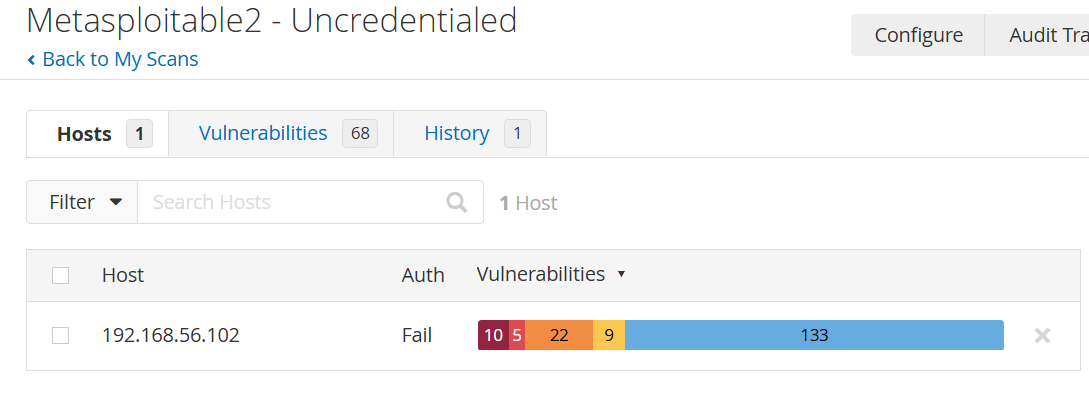
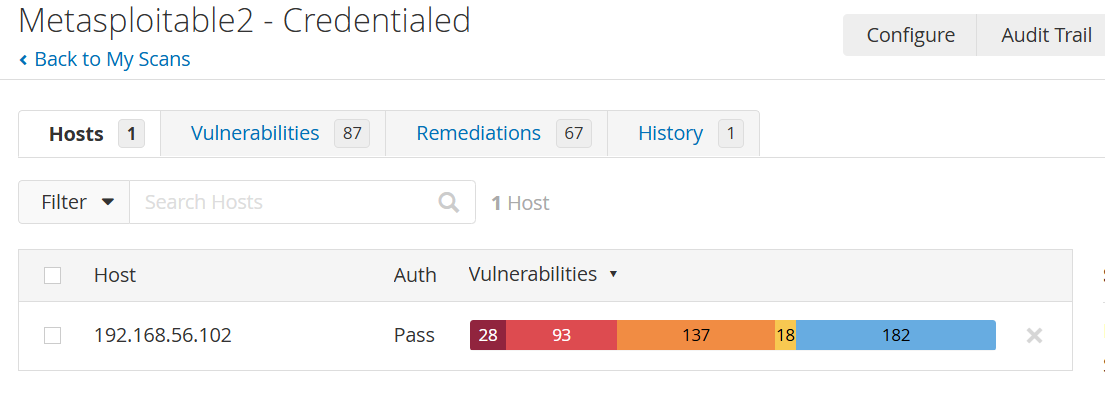
The baseline credentialed scan revealed a heavily vulnerable system, as expected from Metasploitable. Comparing the uncredentialed and credentialed scans is itself instructive — an authenticated scan typically surfaces more findings because it can inspect the system from the inside.
| Severity | Uncredentialed | Credentialed |
|---|---|---|
| Critical | 5 | 6 |
| High | 3 | 3 |
| Mixed | 7 | 9 |
| Medium | 4 | 4 |
| Low | 3 | 2 |
| Info | 46 | 60 |
The credentialed scan surfaced more informational and mixed findings (Info jumped from 46 to 60), confirming the deeper visibility authenticated access provides. Notably, the Critical count barely changed between the two — a reflection of just how openly exploitable Metasploitable is: most of the worst issues are visible even without credentials. The credentialed baseline (6 Critical / 3 High) was used as the reference point for remediation.
Remediation
Remediation was carried out over two rounds. Rather than blindly killing services, I used netstat -tulnp to map listening ports back to their services, then targeted the ones tied to the most severe findings. I worked over SSH from the Windows host — the same way a real admin would manage a remote box — which also made commands and output easy to capture.
msfadmin@metasploitable:~$ sudo /etc/init.d/proftpd stop
# Stop inetd-managed legacy services (Telnet, rsh, rlogin)
msfadmin@metasploitable:~$ sudo /etc/init.d/openbsd-inetd stop
# Stop Samba (vulnerable old SMB)
msfadmin@metasploitable:~$ sudo /etc/init.d/samba stop
msfadmin@metasploitable:~$ sudo pkill -9 distccd
# UnrealIRCd — backdoored IRC daemon
msfadmin@metasploitable:~$ sudo pkill -9 unrealircd
# Tomcat — weak default creds / RCE
msfadmin@metasploitable:~$ sudo /etc/init.d/tomcat5.5 stop
# Java RMI registry — RCE vector
msfadmin@metasploitable:~$ sudo pkill -9 rmiregistry
# VNC — weak-password remote desktop
msfadmin@metasploitable:~$ sudo pkill -9 Xtightvnc
After each action I verified the service was actually down with ps aux | grep <service> before moving on. Across both rounds, nine exploitable services were disabled.
Important caveat (and a real-world lesson): these were runtime stops — the services are down now, but would return on reboot. In production, a permanent fix means disabling them at startup or removing the packages entirely. Because the rescan was run without rebooting, the results accurately reflect the remediation.
The two exposed databases (MySQL on 3306 and PostgreSQL on 5432) were deliberately left running. Unlike the backdoored services, databases aren't inherently critical — they flag for weak credentials or network exposure. The correct real-world remediation is credential hardening and network ACLs, not shutting the database off. They are documented below as a remediation plan rather than a kill.
Verification — Before vs. After
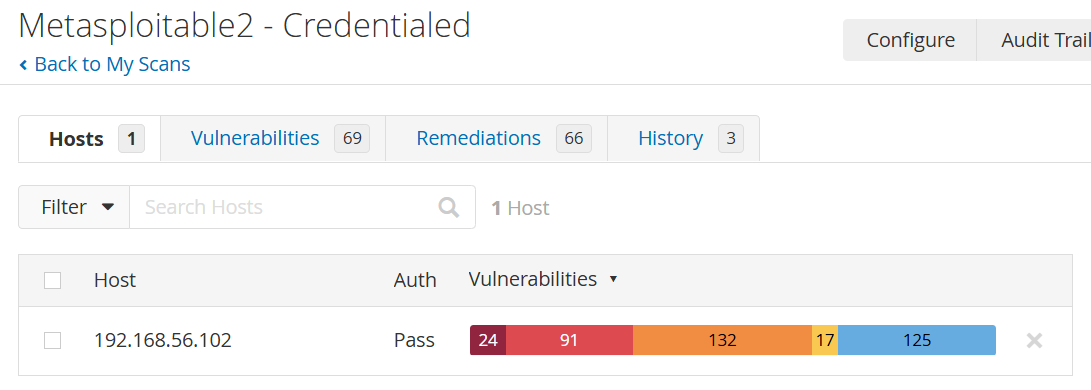
Re-running the credentialed scan against the hardened target confirmed a measurable reduction across every severity category.
| Severity | Baseline | After R1 | After R2 | Change |
|---|---|---|---|---|
| Critical | 6 | 5 | 4 | −33% |
| High | 3 | 1 | 1 | −67% |
| Mixed | 9 | 8 | 7 | −22% |
| Medium | 4 | 3 | 3 | −25% |
| Low | 2 | 2 | 1 | −50% |
| Info | 60 | 57 | 53 | −12% |
An important nuance: nine services were disabled but Critical findings dropped by two, not nine. That's because severity counts don't map one-to-one with services — some services trip High/Medium findings rather than Critical, and the remaining Criticals live in the operating system and core libraries, not in optional services. Recognizing that a vulnerability count isn't the same as the number of distinct problems is part of accurate triage.
Remaining Findings & Risk Decisions
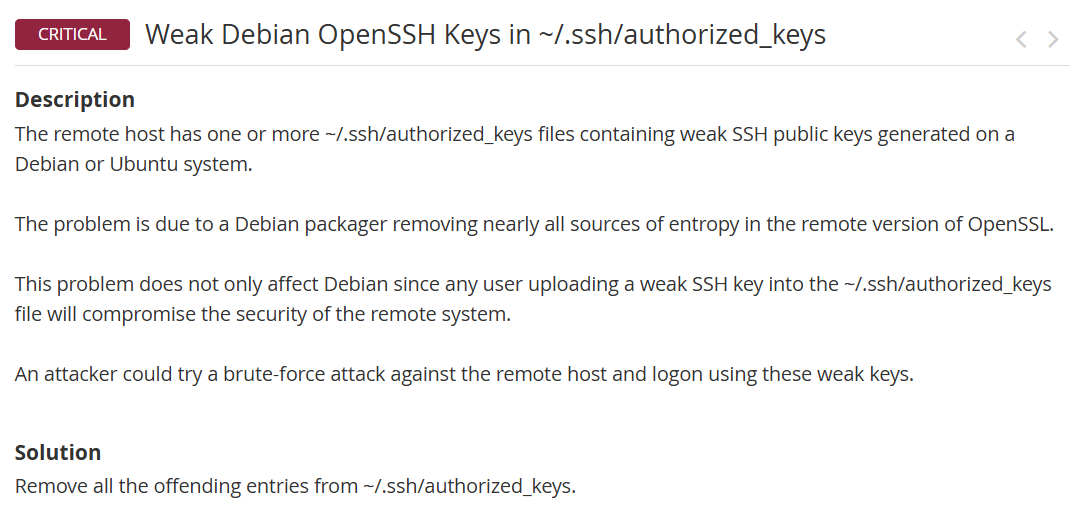
Real vulnerability management is about triage, not chasing zero. The four remaining Critical findings actually trace back to three distinct root causes — Nessus reported the Debian key weakness twice because it detected it through two separate methods (SSL and SSH). Each remaining issue was given a documented disposition.
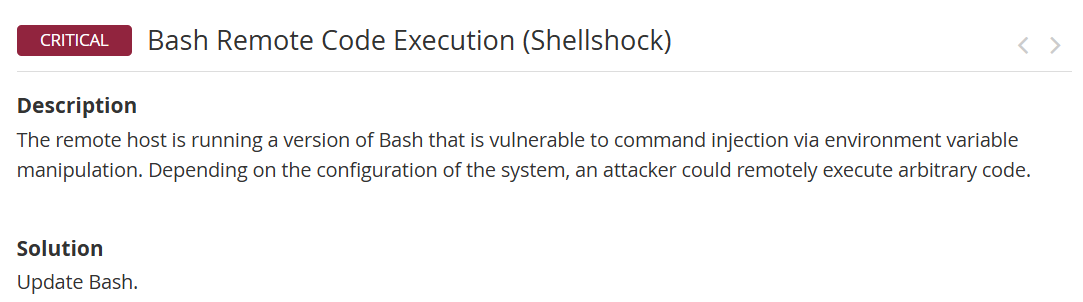
The target runs a version of Bash vulnerable to command injection via environment variable manipulation, allowing remote arbitrary code execution. Nessus's prescribed fix is simply "Update Bash" — a patch-level remediation, not a service that can be disabled.
A 2008 Debian packaging bug crippled the random number generator, so SSH/SSL keys were drawn from a tiny, brute-forceable pool. Nessus flagged this twice — once via SSL detection, once via SSH — but both stem from the same root cause. This one is remediable at the config level by removing the predictable keys from authorized_keys.
The target supports obsolete SSLv2 and SSLv3 protocols. SSLv3 is vulnerable to the POODLE attack and both are long broken. The fix is to disable these protocols in the affected service's configuration and restart it.
SSLProtocol -all +TLSv1.2)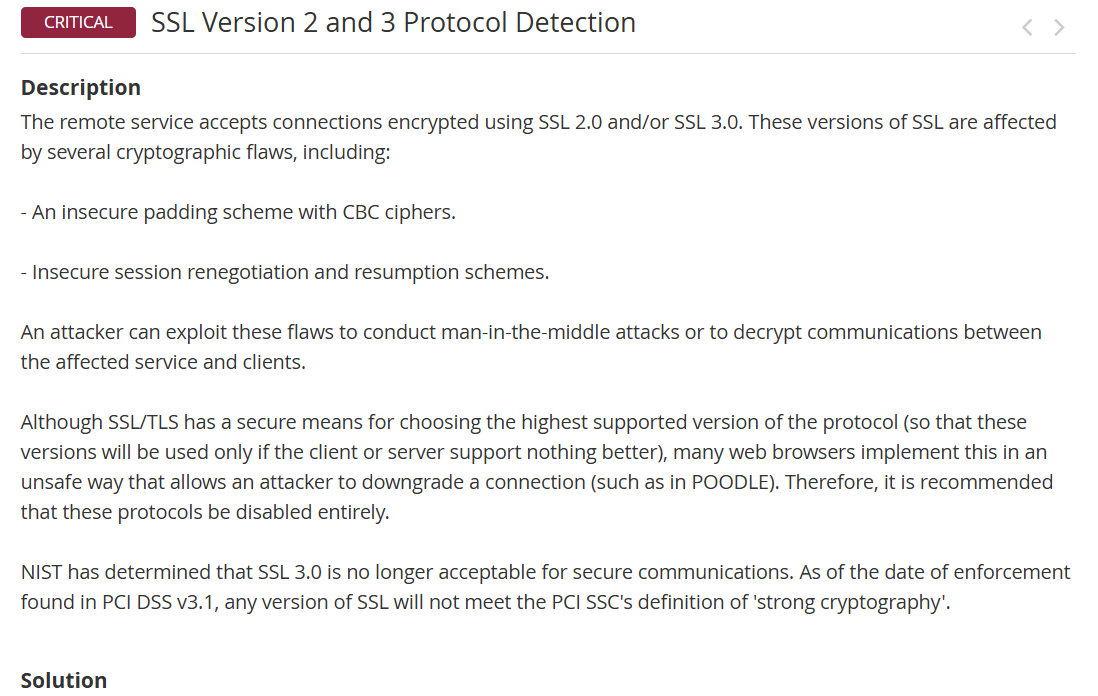

Conclusion
This lab took a deliberately vulnerable host through the full vulnerability management lifecycle using Nessus — the core scanning engine behind Tenable's enterprise platforms. Establishing a credentialed baseline, remediating across two rounds, and verifying with a rescan produced a measurable result: Critical findings down 33% and High findings down 67%, with nine exploitable services disabled.
The more valuable takeaway was in what remained. Driving every Critical to zero wasn't possible — the leftovers lived in the OS and core libraries, not in optional services — so each was given a documented disposition: a remediation plan where a fix existed, or accepted risk with justification where it didn't. That distinction between "remediated," "remediation planned," and "accepted risk" is the heart of real vulnerability management.
Scanning is the easy part; the judgment is in prioritization and risk decisions. This lab gave me hands-on practice with both — running the tooling and reasoning about the results the way a security analyst has to.